ShowIf
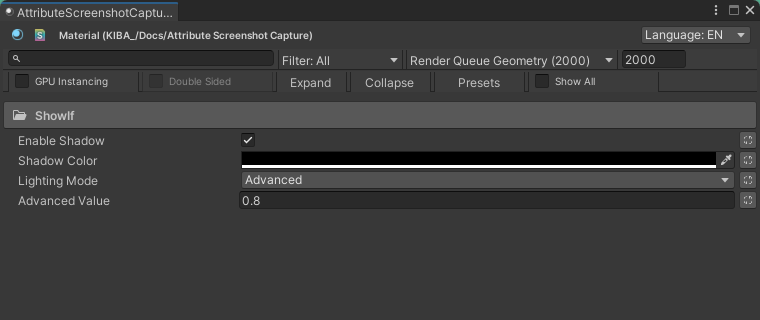
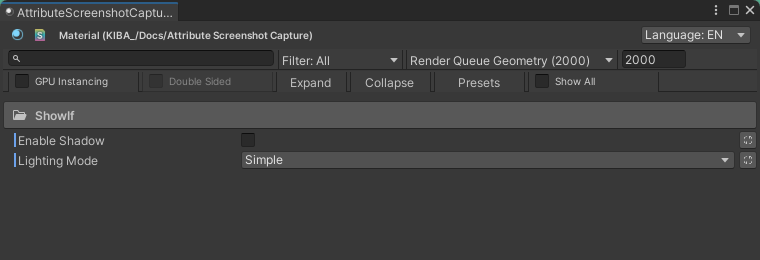
[ShowIf] shows a property only when another numeric material property has the expected value.
[Toggle] _UseRim ("Use Rim", Float) = 0
[ShowIf(_UseRim, 1)] _RimColor ("Rim Color", Color) = (0.4,0.7,1,1)
Syntax
[ShowIf(_Controller)]
[ShowIf(_Controller, value)]
Behavior
[ShowIf(_Controller)]means_Controller == 1.[ShowIf(_Controller, 2)]works for enum-backed float properties.- Comparison uses approximate float comparison.
- In multi-material selection, the property stays visible if at least one selected material satisfies the condition.
- Search and toolbar filters do not reveal condition-hidden properties.
- Hidden properties keep their material values unchanged.
Diagnostics
KIBAMaterialGUI reports diagnostics for:
- missing controller property,
- non-numeric controller property,
- malformed arguments.
Example
Properties
{
    [Group(Lighting)] [Toggle] _Lighting ("Lighting", Float) = 1
    [Group(Lighting)] [ShowIf(_Lighting, 1)] _ShadowColor ("Shadow Color", Color) = (0,0,0,1)

    [Group(Advanced)] [Enum(Simple, 0, Advanced, 2)] _Mode ("Mode", Float) = 0
    [Group(Advanced)] [ShowIf(_Mode, 2)] _AdvancedValue ("Advanced Value", Float) = 1
}